The $1,500 Lambda Lesson: Why Dead Letter Queues Matter (Part 1)
Sometimes the best lessons are the most expensive ones. This is the story of how a seemingly innocent PDF upload turned into a 48-hour nightmare that cost my company $1,500 and taught me why AWS best practices aren't just suggestions—they're guardrails that prevent disasters.
📖 Series Note: This is Part 1, focusing on the critical importance of Dead Letter Queues. This incident was the first step toward building a more robust, generalized solution that I'll cover in Part 2.
TL;DR
⚠️ Warning: A missing Dead Letter Queue (DLQ) on an SQS-triggered Lambda function processing OCR created an infinite retry loop when a user uploaded a 200-page PDF. The function timed out, the message returned to the queue, and the cycle repeated for 2 days, racking up $1,500 in AWS costs.
The Setup: What Could Go Wrong?
Our architecture was straightforward—or so we thought. We had built a document processing system where users could upload PDFs for OCR (Optical Character Recognition). The workflow was simple:

The Lambda function had a 15-minute timeout (the maximum allowed). We processed entire PDF files in a single Lambda invocation—no chunking, no preprocessing. Most PDFs users uploaded were 5-10 pages and processed in under a minute. We deployed to production, and everything worked smoothly—until it didn't.
The Incident: When PDFs Attack
On a quiet Tuesday afternoon, a user uploaded what appeared to be a normal PDF. Except it wasn't normal—it was a 200-page scanned document. Each page was a high-resolution image that needed to be OCR'd.
Since we had no preprocessing or chunking, Lambda tried to process all 200 pages in a single invocation. But here's the problem: these weren't normal PDF pages—they were high-resolution scans, each image several megabytes in size. Processing 200 high-res images took well over 15 minutes.
Here's what happened next:

The function was getting invoked every few minutes, running for 15 minutes each time, failing, and restarting. This went on for 2 full days before we noticed.
The Nightmare Metrics
🔥 Incident Stats:
- Duration: 48 hours
- Lambda Invocations: ~192 times (every 15 minutes)
- Total Compute Time: 2,880 minutes (48 hours)
- Total Cost: $1,500
Why It Cost So Much
Let's break down the costs:
Cost Analysis
- Lambda Compute: Our function was configured with 3GB of memory (needed for OCR processing). Running for 2,880 minutes with high memory allocation cost approximately $1,200
- OCR API Costs: We were using AWS Textract, which charges per page. 200 pages × 192 invocations = 38,400 page API calls ≈ $300
- SQS Costs: Minimal, but added up with the constant polling
- CloudWatch Logs: Gigabytes of error logs from failed invocations
What Went Wrong: The Architecture Mistakes
1. No Dead Letter Queue (DLQ)
This was the critical mistake. A Dead Letter Queue is exactly what it sounds like—a place where failed messages go to die instead of being retried indefinitely. Without it, our message kept bouncing back to the main queue.
2. No Maximum Receive Count
Even without a DLQ, we could have set a maxReceiveCount on the SQS queue to limit retries. We didn't. The message was free to retry forever.
3. No File Size Validation
We never checked the size or page count of PDFs before processing. A simple validation could have rejected files over a certain threshold or routed them to a different processing pipeline.
4. No CloudWatch Alarms
We had basic monitoring but no alarms for:
- Lambda execution duration approaching timeout
- High error rates
- Unusual number of invocations
- Cost anomalies
5. No Chunking or Preprocessing
We naively processed entire PDFs in a single Lambda invocation. A 200-page PDF with high-resolution scans would never finish within 15 minutes. We should have implemented chunking and batch processing from the start.
The Fix: How We Prevented This From Happening Again
After the incident (and the uncomfortable conversation with finance), we implemented several changes:
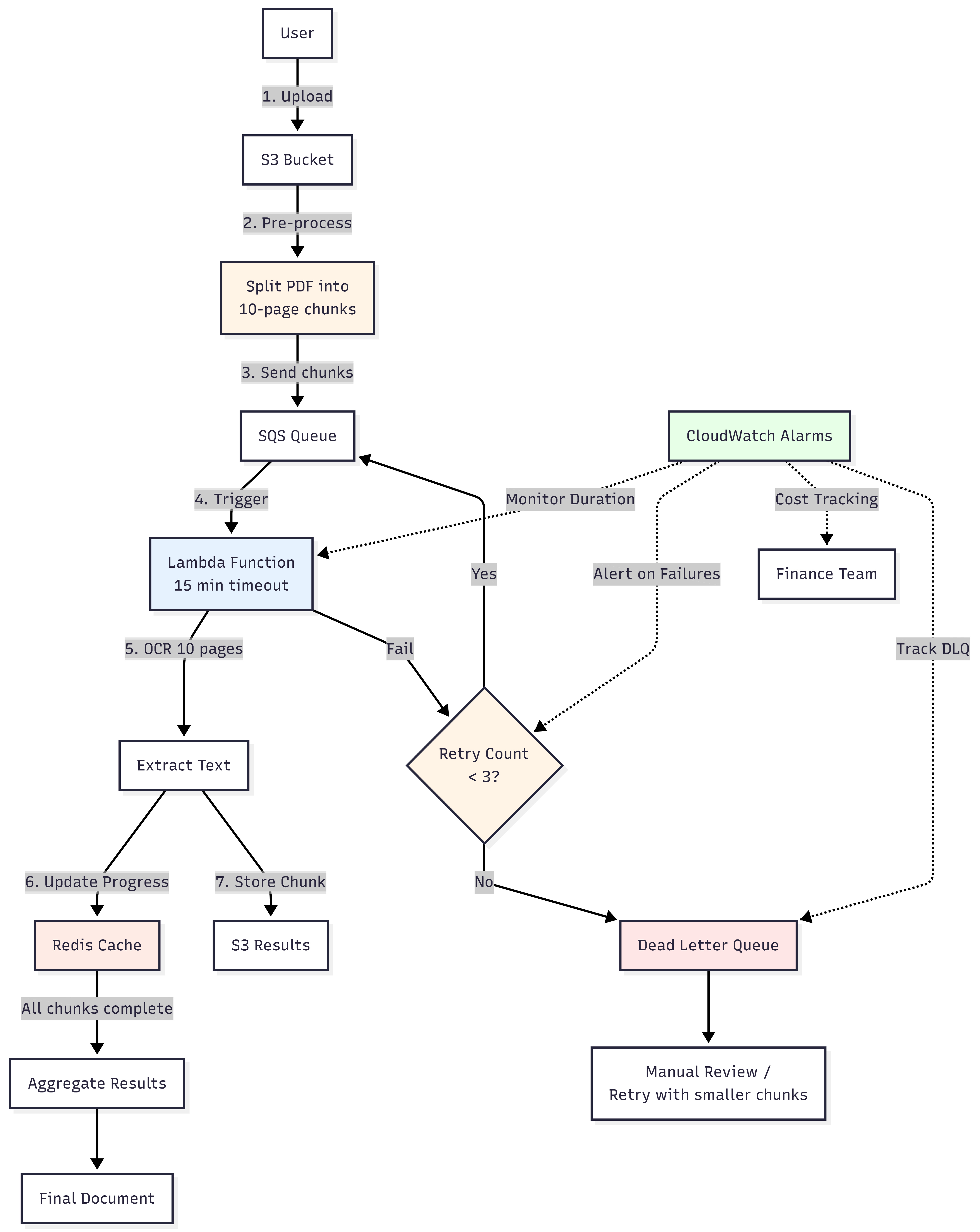
1. Implemented Dead Letter Queues
Configured our SQS queue with a Dead Letter Queue and set maxReceiveCount to 3. Now, after 3 failed attempts, messages go to a DLQ where we can inspect them and handle them manually or with a different process.
2. Added Preprocessing and Chunking
We implemented a preprocessing step to split PDFs into manageable chunks:
- Split PDFs into 10-page chunks for normal documents
- Detect file size and reduce to 5-page chunks for high-resolution scans (files with >5MB per page)
- Add metadata tracking in SQS messages (file ID, chunk index, total chunks)
- Send each chunk as a separate SQS message for parallel processing
3. Implemented Redis for Progress Tracking
Added Redis-based progress tracking to handle chunk completion and aggregation. Each Lambda updates Redis after processing a chunk, and we aggregate results only when all chunks are complete.
4. Set Up Comprehensive CloudWatch Alarms
Set up alarms to catch issues early:
- Lambda execution duration alarm (triggers when >80% of timeout)
- Cost anomaly detection (alerts when daily costs exceed 2x average)
- Error rate monitoring (alerts when error rate >10%)
- DLQ depth monitoring (alerts when messages pile up in DLQ)
5. Added Timeout Handling Inside Lambda
Added graceful timeout handling within Lambda functions. The function now checks remaining execution time before processing each page. If less than 30 seconds remain, it saves progress to Redis and exits gracefully, allowing the chunk to be reprocessed from where it left off.
6. Implemented Circuit Breaker Pattern
If we detect repeated failures for the same document, we automatically route it to a manual review queue instead of continuing to retry.
Key Takeaways
Lessons Learned
- Always configure Dead Letter Queues for SQS-triggered Lambdas. Always. No exceptions.
- Set maximum receive counts to prevent infinite retries
- Validate input before processing—file size, format, complexity
- Match your architecture to your workload—synchronous Lambda isn't always the answer
- Monitor everything—costs, errors, duration, invocations
- Set up billing alarms—catch cost anomalies early
- Handle timeouts gracefully—save progress, don't just fail
- Test with edge cases—what happens with a 1000-page PDF?
The AWS Well-Architected Framework Was Right
In retrospect, every mistake we made violated principles from the AWS Well-Architected Framework:
- Reliability: No fault tolerance for failures
- Cost Optimization: No cost monitoring or controls
- Operational Excellence: Insufficient monitoring and observability
- Performance Efficiency: Wrong compute model for the workload
The Moral of the Story
Dead Letter Queues are not optional They are the safety net that keeps systems from collapsing into infinite retry loops and runaway costs. Skipping them turned into a $1,500 lesson—and a reminder that AWS best practices are written in real incidents, not theory.
At first, I stayed composed and focused on fixing the architecture. But once the root cause was clear—and I realized the failure traced back to a decision I had made—the panic set in. The system was bleeding, and I owned it.
We moved fast. DLQs, chunking, Redis-based state tracking, and CloudWatch alarms stopped the damage and stabilized the pipeline. A week later, after working with AWS support, the $1,500 was refunded.
But the real value wasn’t the refund. It was the shift in mindset. This incident marked the moment I stopped building systems that work and started building systems that are designed to fail safely.
Final Thoughts
That $1,500 mistake was expensive, embarrassing, and completely avoidable. But it taught our team more about AWS architecture, error handling, and defensive programming than any tutorial could have.
Now, whenever we design a new system, we ask:
- "What happens if this fails?"
- "What happens if this keeps failing?"
- "What happens if someone sends us a 200-page PDF?"
Because in the cloud, if something can go wrong and you haven't planned for it, it will go wrong—and it will probably cost you money.
💬 Have You Made Similar Mistakes?
I'd love to hear about your AWS horror stories and the lessons you learned. What was your most expensive cloud mistake? Let's connect and share war stories—sometimes the best way to learn is from each other's failures.